If your hosting provider provides you with DirectAdmin to manage your hosting, please ensure that it has cronjob access. To setup your cronjob with DirectAdmin, follow the steps below:
Login to your DirectAdmin control panel and click on the
Cronjobslink as shown below.
Upon clicking on the cronjob icon, you will be presented with the following screen. You will need to enter the following,
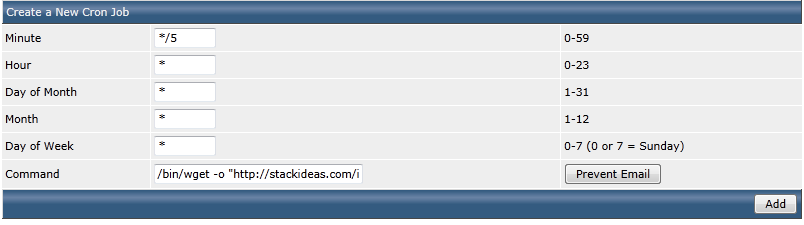
The configuration is broken down into the following:
Minute- Enter the interval for minute. The example above uses*/5which means the script is executed every 5 minutesHour- Enter the interval for minute. The example above uses*which means the script is executed every hourDay- Enter the interval for minute. The example above uses*which means the script is executed every dayMonth- Enter the interval for minute. The example above uses*which means the script is executed every monthWeekday- Enter the interval for minute. The example above uses*which means the script is executed every weekCommand- The command to be executed in the cronjob. Please read cronjob command here

