Please ensure that you have:
Already backup your existing database
Set the site to offline to avoid any interference with the database
To migrate K2 posts over to EasyBlog, please follow the guide below:
Access Migration Section
Navigate toJoomla > Components > EasyBlog > Migrators, then click on Migrators.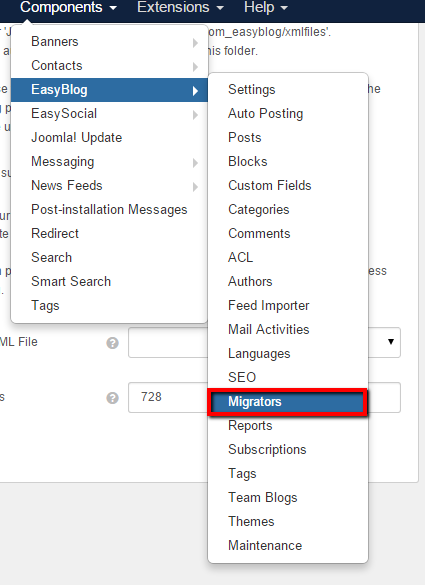
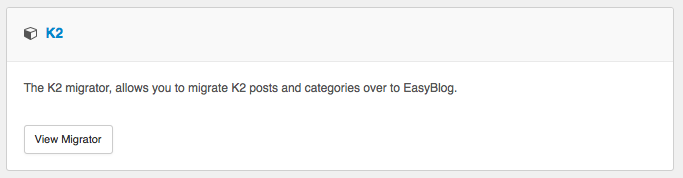
Next, find the K2 Migrator in listing of migrators. Click on View Migrator.
Migration Options
Configure the migration options as you can see from the screenshot below: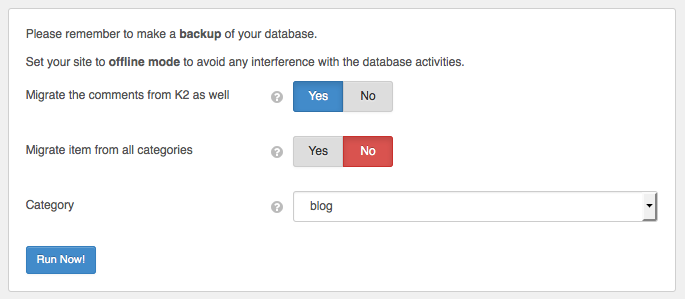
Migrate the comments from K2 as well
If turned on, Easyblog will also migrate K2 comments.Migrate Item From All Categories
If turned on, Easyblog will also migrate items from all K2 categories.Category
Select a specific category that you would like EasyBlog to import from.
Finalize Migration
Click on Run Now! button and wait until the migration process finishes. The migration process might take up to several minutes depending on how large is your database.


