To fully integrate Helix theme's design with Joomshaper Helix Ultimate template into EasyBlog, perform the following steps.
Configure EasyBlog to use the new
Helixtheme. To do so, head over toEasyBlog > Themesand setHelixas the default theme.Make sure turn on Compile SCSS to CSS
Templates > shaper_helixultimate > Template Options > Advanced > SCSS
Create a
custom-eb.scssintotemplates/shaper_helixultimate/scss/custom-eb.scssApply these css codes into
custom-eb.scss#eb .btn-primary { background: $link_color !important; border-color: $link_color !important; &:hover { border-color: $link_hover_color !important; background-color: $link_hover_color !important; } } #eb .eb-card, #eb .eb-showcases, #eb .eb-empty, #eb .eb-head, #eb .eb-table-filter { color: $text_color; background-color: $bg_color; } // Background Shade #eb .eb-comments-empty, #eb .eb-entry-author-recents { background-color: darken($bg_color, 3%); } #eb .eb-table tbody > tr td .post-title { color: $text_color; } #eb .eb-table tbody > tr td .post-meta a, #eb .eb-table tbody > tr td .post-actions a { color: $link_color; } #eb .eb-table tbody > tr td .post-meta a:hover, #eb .eb-table tbody > tr td .post-actions a:hover { color: $link_hover_color; } #eb .eb-post-hits, #eb .eb-post-comments a, #eb .eb-card__title, #eb .eb-card__title a, #eb .eb-card__meta, #eb .eb-card__ft, #eb .eb-card__ft a { color: $text_color; }Open
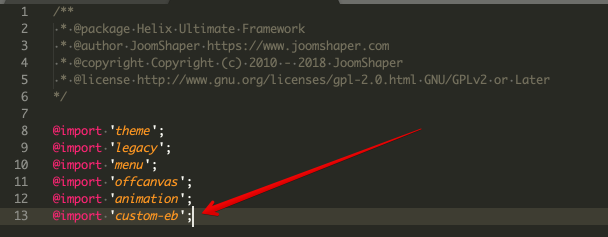
templates/shaper_helixultimate/scss/master.scssand insert@import 'custom-eb';